Enlarge Cursor Size Trick

Sunday, May 3, 2009 · 0 komentar

Word processing applications typically have a vertical blinking cursor that allows you to show the position of the text that will appear next. So if you want more easier to find that cursor, and with a little trick, you can enlarge the size of the cursor is. Follow the steps below:

  1. Open Start-> Control Panel.
  2. Type "optimize visual display" in the search box in the Control Panel.
  3. After that, the shortcut will show search results, click the shortcut.
  4. On the line "Set the tickness of the blinking cursor", change the value of a combo box with a greater value.
  5. Click the save button to save the changes.


Trick To Restore Missing Document in MyComputer

Saturday, May 2, 2009 · 0 komentar

Here are tips to restore the missing documents folder in My Computer :

  1. Open regedit
  2. Go: HKEY_LOCAL_MACHINE / Software / Microsoft / Windows / CurrentVersion / Explorer / DocFolderPaths
  3. Select Edit menu> New> String Value and name in accordance with the username that is used in Windows (for example: Chippers)
  4. Double click on the value and enter the path where you reside Documents (ex D: \ Documents)
DocFolderPaths Trick


More Shortcut Menu On Recycle Bin

Friday, May 1, 2009 · 0 komentar

Usually recycle bin menu only has restore, cut, delete and properties menus. To add more menu, follow this steps :

  1. Open regedit
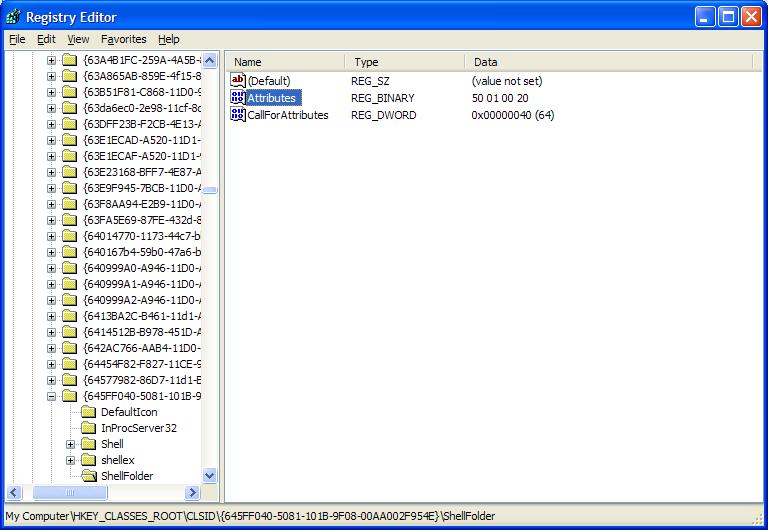
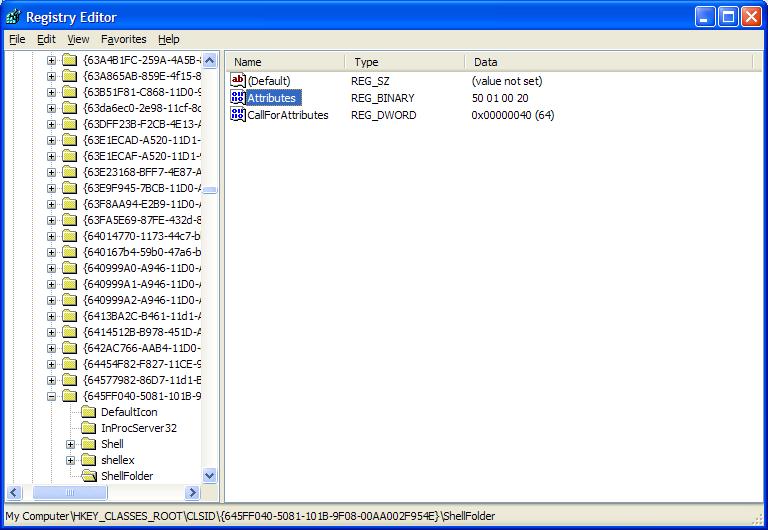
  2. Find key : HKEY_CLASSES_ROOT/CLSID{645FF040-5081-101B-9F08- 00AA002F954E}/ShellFolder
  3. Double click Attributes and chane number in Value Data with following numbers:
  • 0000 50 01 00 20 > Rename
  • 0000 60 01 00 20 > Delete
  • 0000 70 01 00 20 > Rename & Delete
  • 0000 41 01 00 20 > Copy
  • 0000 42 01 00 20 > Cut
  • 0000 43 01 00 20 > Copy & Cut
  • 0000 44 01 00 20 > Paste
  • 0000 45 01 00 20 > Copy & Paste
  • 0000 46 01 00 20 > Cut & Paste
  • 0000 47 01 00 20 > Cut, Copy & Paste


Hide Recycle Bin

· 0 komentar

In addition to rename recycle bin, the recycle bin can also be hidden. To be able to hide the recycle bin follow these steps:

  1. Open Regedit
  2. Find this key : HKEY_LOCAL_MACHINE / Software / Microsoft / Windows / CurrentVersion / Explorer / Desktop /Namespace.
  3. Delete subkey {645FF040-5081-101B-9F08-00AA002F954E}, and then Restart the computer to see results.
  4. To unhide, back a combination of numbers {645FF040-5081-101B - 9F08-00AA002F954E}.


Display Rename Menu on Recycle Bin

· 0 komentar

Recycle bin name can be changed according to our wishes. To be able to display the rename menu on the recycle bin follow these steps:
  1. Open Regedit
  2. Go to: HKEY_CLASSES_ROOT/CLSID/{645FF040-5081-101B-9F08-00AA002F954E}/ShellFolder
  3. Double click on Attributes > Edit Binary Value. On Value Data, change number to: 0000 50 01 00 20.


Followers

Site Sponsors

Add to Technorati Favorites
Click Here to Advertise On My Blog