Prevent a Shutdown Tips

Sunday, June 28, 2009 · 0 komentar

With these tips, the computer will not shutdown by access start menu then select Turn Off Computer option. Sometimes it is necessary to avoid someone to turn off our computers. For that do the following:
  1. Launch the Registry Editor (Run->Regedit).
  2. Go to HKEY_CURRENT_USER \ SOFTWARE \ Microsoft \ Windows \ CurrentVersion \ Policies \ Explorer.
  3. Right-click the Explorer subkey and select New | DWORD Value.
  4. NoClose the key name and press Enter twice.
  5. Type 1 in the Value Data text box and click OK.
  6. Restart Computer.
Now, to be able to turn off the computer, just access Task Manager by pressing Ctrl + Alt + Delete, then pull down the Shut Down menu and select the Turn Off option.

Prevent a Shutdown Tips

Changing Font Display in Windows Explorer

Saturday, June 27, 2009 · 0 komentar

As we know, Windows Explorer and My Computer display the same font that Windows XP uses for icon titles on your desktop, that is Tahoma 8pt. If you want to change the font or font size used in Windows Explorer, follow these steps:

  1. Right-click on the desktop and select Properties to enter the menu on the Display Properties settings.
  2. Select the Appearance tab.
  3. Click the Advanced button.
  4. Select Icon from the drop-down menu item.
  5. Select the font you like dar the drop-down menu and the font size font.
  6. Click OK to close the Advanced Appearance window and the Display Properties.

Slow Motion Animation

· 0 komentar

With this tips, you can enable “Slow Motion” animation on windows Vista. This tips will work if Windows Aero glass theme activated. To use it, holding the “shift” key while minimizing , maximizing , closing a window.


First, open notepad then copy paste code below to notepad

Windows Registry Editor Version 5.00

[HKEY_CURRENT_USER\Software\Microsoft\Windows\DWM]
"Animations"=dword:00000001
"AnimationsShiftKey"=dword:00000001


Or you can download the .reg file here

Slow Motion Animation

Remove Security Center Icon

Sunday, May 10, 2009 · 0 komentar

Windows Vista comes with many features, including Windows Security Center. This feature serves as the central control of the PC security against various attacks that may attack the PC such as viruses, spyware, worms and other malware.
Proof of the existence of these features will be felt immediately after the installation windows for first time. A shield-shaped icon appears in the notification area for member-level security information on the PC.
If the condition is considered less secure PC, the icon will be quite choosy with regard to the security of users PC. Therefore, for those of you who want to hide the Security Center icon, follow the steps below:

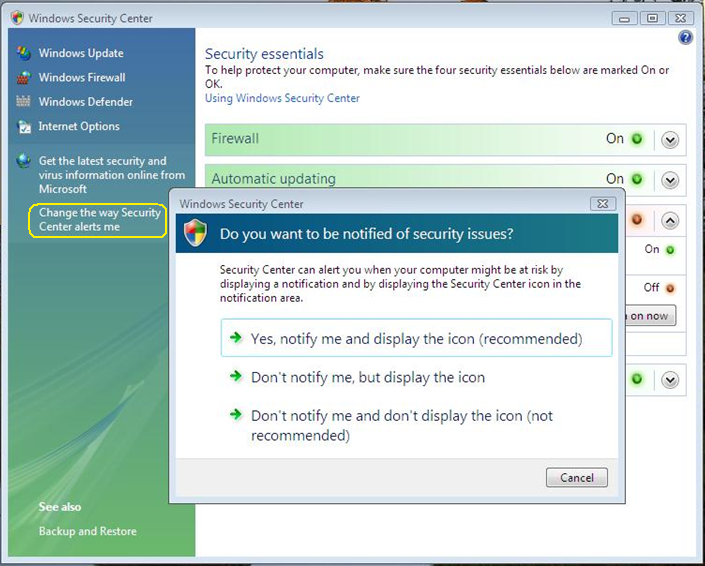
  1. Open the Control Panel and select Security Center.
  2. On Window Security Center window, click Change the Way Security Center alerts me that placed on left panel.
  3. In the dialog box that appears with the question Do you want to be notified of security issues? Select Don't notify me and don't display the icon.
  4. Close the windows Security Center window.


Shutdown and Reboot Shortcuts

Saturday, May 9, 2009 · 0 komentar

First, create a shortcut on your desktop by right-clicking on the desktop, choosing New, and then choosing Shortcut. The Create Shortcut Wizard appears. In the box asking for the location of the shortcut, type shutdown. After you create the shortcut, double-clicking on it will shut down your PC.

But you can do much more with a shutdown shortcut than merely shut down your PC. You can add any combination of several switches to do extra duty, like this:

shutdown -r -t 01 -c "Rebooting your PC"

Double-clicking on that shortcut will reboot your PC after a one-second delay and display the message "Rebooting your PC." The shutdown command includes a variety of switches you can use to customize it.

Use this technique to create two shutdown shortcuts on your desktop—one for turning off my PC, and one for rebooting. Here are the uses:

shutdown -s -t 03 -c "Bye Bye.."
shutdown -r -t 03 -c "Ill be back.."


Parameters :

-s
Shuts down the PC.

-l
Logs off the current user.

-t nn
Indicates the duration of delay, in seconds, before performing the action.

-c "messagetext"

Displays a message in the System Shutdown window. A maximum of 127 characters can be used. The message must be enclosed in quotation marks.

-f
Forces any running applications to shut down.

-r
Reboots the PC.


Followers

Site Sponsors

Add to Technorati Favorites
Click Here to Advertise On My Blog