iexpress

Monday, March 30, 2009 · 0 komentar

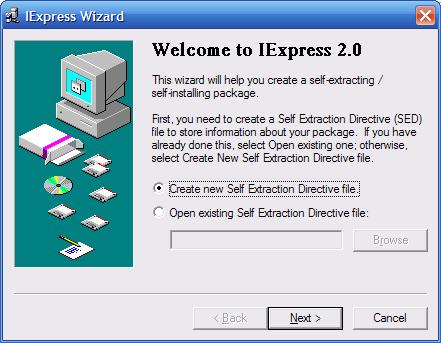
iexpress is integrated utility on windows xp that can be used to compress and create self extraction file. To use for this feature, follow these steps:

  1. go to run (windows + R)
  2. type "iexpress" (without quote)
  3. IExpress Wizard will show


Block Access From Computer to FlashDisk

Saturday, March 28, 2009 · 0 komentar

This tips should prevent transfer data from your Computer to Flashdisk. You will be able to transfer data from Computer to Flashdisk, but not from FlashDisk to Computer. Follow these steps:

  1. Press windows + R keys togethe.
  2. Run window will appear, type regedit.
  3. Go to HKEY_LOCAL_MACHINE \ SYSTEM \ CurrentControlSet \ Control .
  4. Right-click on the Control folder, select New -> Key, Rename the new folder with "StorageDevicesPolicies".
  5. Go to the folder "StorageDevicesPolicies", right click, select New -> Dword, Rename with "WriteProtect".
  6. The contents of the data value "WriteProtect" with 1.


Change Owner Name Windows Vista

Friday, March 27, 2009 · 0 komentar

Trick below is used to change the name of ownership on windows vista. Follow the steps below:

  1. Press Windows + R keys simultaneousl.
  2. In the run window, type regedi.
  3. Go to HKEY_LOCAL_MACHINE \ SOFTWARE \ Microsoft \ Windows NT \ CurrentVersion.
  4. Double-click on RegisteredOwner, replace the value data as you wish.


On Screen Keyboard

· 0 komentar

As we know, the windows have many hidden features. One of them is on screen keyboard. To create this feature, follow these steps:

  1. Click Start -> All Programs.
  2. select Accessories -> Accessbility.
  3. On the menu that appears, select On-Screen Keyboard.

Or with a quick way:

  1. Press Windows + R keys together.
  2. Run window will appear.
  3. Type "osk" ( without quote) and press Enter.


Disable Hibernation

Wednesday, March 25, 2009 · 0 komentar

Windows hibernation background services use a very large amount of system resources. If you are like most people you don’t use the Hibernate feature very much so you may want to disable it to give Vista a performance boost.
To shut down Hibernation:

  1. Click the Start button
  2. Select Control Panel
  3. Click the Classic View on the left hand side
  4. Double-click on Power Options
  5. Select Change Plan Settings
  6. Choose Change Advanced Power Settings
  7. Click the Sleep “plus” icon
  8. Click the Hibernate After “plus” icon
  9. Adjust your selector down to zero minutes
  10. Click Apply
  11. Click OK


Followers

Site Sponsors

Add to Technorati Favorites
Click Here to Advertise On My Blog